




Web Application Development: The Hands-On Guide (2026)

Years ago, most web resources were static. Today, dynamic and interactive web pages are so common that we’ve come to expect them wherever we go online. This is possible thanks to the web application technology, and it’s the one that is easy to take it for granted, even though web apps are responsible for countless daily tasks, from sending emails to doing grocery shopping.
Web application development is ubiquitous on the modern internet, but how exactly does it work, what sets it apart from building websites or mobile apps, and how to build an app that helps you meet your business goals? This guide will walk you through the whole picture, including the common types of web apps, the technologies behind them, how much it costs to build one, and what the near future of web applications will bring.
Key Takeaways
- The real test of app versus website is behaviour: if a page changes based on what you do without reloading, it’s a web application.
- Household-name “static” sites usually aren’t — news and media sites are dynamic; true static apps are documentation sites, landing pages, and Jamstack builds.
- Progressive web apps can work offline through caching and install like native apps, which a single-page app can’t do.
- Choosing how to build comes down to three things — your budget, the scale you need, and how unique your app’s logic is.
- State handling is the hidden core of good design — planning the loading, empty, error, and success view for every interaction.
What Is a Web App?
A web application is interactive software that runs inside a web browser rather than being installed on a device. It lives on a remote server, loads through a URL, and lets users complete tasks — sending email, shopping, editing documents — without downloading anything.
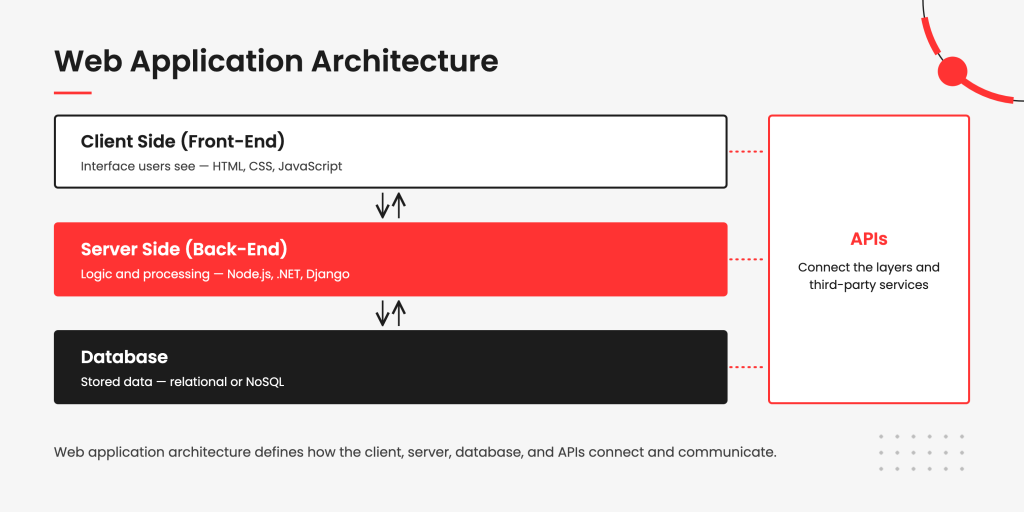
Web apps come in many forms. Depending on what people or organizations need, they carry different features and functionality to make specific tasks easier and give users a richer experience. A few components, though, are common to all of them:
- Client (or web browser) — where the data interactions between client and server happen.
- Server — a device or program that answers the client’s request by supplying the data it needs.
- Protocols — a set of standardized rules defining how data travels between the server and the user’s device. The core web protocols are HTTP and HTTPS, which run on top of the TCP/IP transport layer that carries the data across the network.
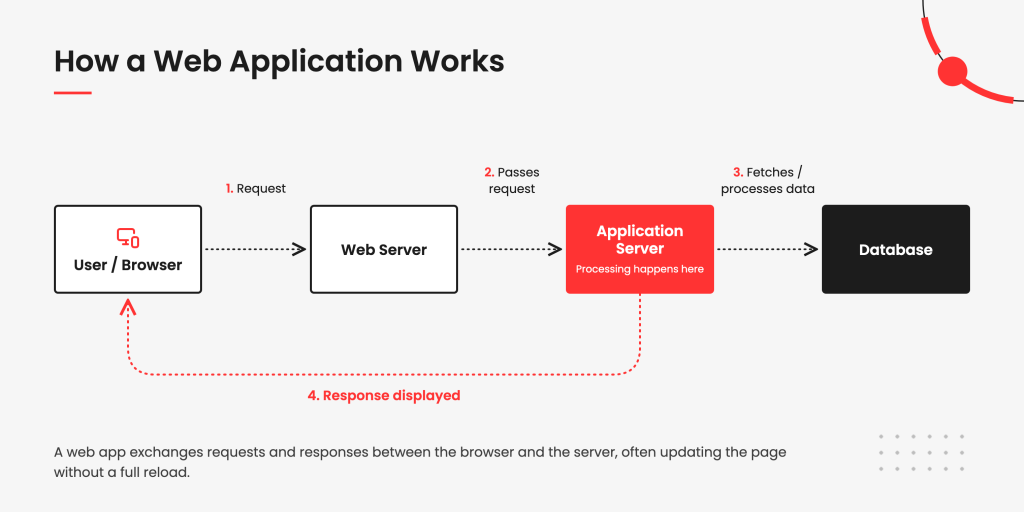
Here is how it works in practice:
- A user sends a request to the server, through a web browser or another client application connected to the internet.
- The server receives the request and passes it to the web application server to process.
- The application server does what was asked and sends back the result.
- The server displays that result on the user’s screen.
Everyday web apps include online forms, social media, messengers, browser games, shopping carts, video streaming, and email.

“The simplest way I explain it to clients is that a website mostly shows you information, while a web application lets you work with that information — change it, submit something, get a result, and so on. The line between the two isn’t always clear, but usually you can tell by looking at the business logic and what users can actually do.”
How to develop a web app: The 7 steps
The process of web-based application development for two different apps is never the same and largely depends on the app type, feature scope, scale, platforms, and other factors. At the same time, any web app development project includes a sequence of standard steps:
- Analyze the idea: Define the audience, the problem it solves, and what makes it different before any code is written.
- Plan the build: Set scope, team, timeline, budget, and methodology together with stakeholders.
- Design the product: Turn requirements into wireframes and a clickable prototype in a tool like Figma.
- Develop the app: Build the front end, back end, and database, usually in short iterative sprints.
- Test continuously: Run functional, compatibility, and performance checks alongside development, not after it.
- Launch: Deploy to production and plan the rollout and user onboarding.
- Maintain and improve: Monitor performance, gather feedback, and ship updates to keep the app relevant.
Further down, we will cover each stage in detail, including typical durations and deliverables.
Every product starts with an idea.
Let’s talk about how to build yours.


Web Apps and Websites: How Do They Compare?
Websites and web applications can look deceptively similar at first glance, even after you start interacting with them. However, these two solutions have different goals, purposes, and architectures, so it’s important to know how they differ from each other.
The main difference is interaction: a web application lets users act on data, while a website mostly presents information for reading. A website shows text, images, and video, and changes only when someone reloads or the owner republishes it. A web application responds to what you do in real time — you can enter data, run a search, or complete a transaction without the page reloading.
Because web apps run in a browser like any site, they are easy to mistake for websites, and the line between them can look blurry. The clearest test is behavior, not appearance. A web app always has at least one interactive component you can exchange information with — think Gmail or Google Docs for a single focused task, or Amazon and Kayak for something more complex.
In short: if a page changes based on what you do without reloading, it’s a web application; if it only displays fixed content, it’s a website.
| Criteria | Web Applications | Websites |
| Functionality | Dynamic and interactive; users perform tasks and manipulate data. | Primarily informational or content-based. |
| User input | Users regularly input data, run transactions, or engage in complex interactions. | Minimal input, usually through a contact form or comment. |
| Purpose | Facilitate specific tasks — online shopping, collaboration, project management. | Present information to visitors. |
| Data handling | Data is processed in real time, often with complex logic. | Information is displayed with little or no processing. |
| Loading | Content updates dynamically, so users navigate without full page reloads. | Navigation typically loads a new page each time. |
| Examples | Facebook, Spotify, Uber, Amazon, Trello. | Company brochure sites, blogs, portfolios, and simple landing pages. |
Web Apps and Mobile Apps: Key Differences
When accessed through a mobile browser, a well-designed web app can look almost indistinguishable from a native mobile application. The core difference is access: a web app runs in any browser across devices, while a mobile app is installed on one platform and tied to that device. A good web application works equally well on iOS, Android, and desktop, reached through a URL with nothing to download. A mobile app is built for a specific platform — an iOS native app runs only on iOS — and has to be installed before it can be used.
That single distinction drives most of the others, from how updates reach users to how each app is distributed. Web apps update instantly on the server, so everyone gets the latest version on next load. Mobile apps push updates through an app store, and users often have to install them.
In short: choose a web app for reach across devices with zero installation, and a mobile app when you need deep device access and top performance on one platform.
| Criteria | Web Apps | Mobile Apps |
| Platform | Run in web browsers on desktops, laptops, tablets, and phones. | Built specifically for mobile devices like smartphones and tablets. |
| Installation | Accessed by entering a URL in the browser. | Downloaded and installed before use. |
| Technology | Built with web technologies such as HTML, CSS, and JavaScript. | Built with platform-specific languages — Swift for iOS, Kotlin for Android. |
| Performance | Slightly slower, constrained by the browser and network latency. | Faster, optimized for the platform with direct device access. |
| Updates | Instant and server-side; no user action needed. | Installed manually or through automatic app-store updates. |
| Distribution | Shared via a URL. | Distributed through app stores with a review process. |
Plenty of companies build both a web and a mobile app, so they can reach a broader audience and give users a consistent experience across every device.
Web Apps vs. Hybrid vs. Native Application Development
Native, hybrid, and web applications can share a lot of their functionality and user interface, but all three require a different development approach. Each type trades off reach against device access: web apps run anywhere with no install, native apps deliver the best performance on one platform, and hybrid apps sit in between. Native and hybrid are both mobile app types. A native app is built for a single platform — iOS, Android, or Windows — and can’t run on another. A hybrid app combines web and native elements, so it can ship across platforms with minimal script changes, which is why developers often favour it; Instagram is a well-known example.
“With how far PWAs and WebAssembly have come, the vast majority of business tasks — by my estimate, around 80% — that used to require separate native iOS and Android apps can now be covered by one well-built web application. Native development still makes sense in some cases, but it’s no longer the default choice for every complex product.”
Knowing where each one fits saves rework later, since switching approaches mid-project is expensive. The table below lines up all three so the trade-offs are easy to weigh at a glance.
| Criteria | Web App | Native App | Hybrid App |
| Platform | Runs in browsers on any device. | Built for one specific platform. | Web tech wrapped in a native shell. |
| Installation | None required. | Installed from an app store. | Installed from an app store. |
| Performance | Slightly slower than native. | Best; optimized for the platform. | Slightly slower than fully native. |
| Device access | Limited to browser capabilities. | Full access to all device features. | Native features via plugins. |
| Distribution | Accessed via a URL. | App stores only. | Distributed through app stores. |
| Testing | UI, connectivity, and compatibility. | Screen, gesture, and network testing. | Both web and native test coverage. |
In short: pick a web app for the widest reach, a native app when performance and full device access matter most, and a hybrid app when you want broad coverage on a tighter budget.

What Are the Benefits of Web Apps for a Business?
There are many reasons why web apps have overtaken websites for most business purposes: on one hand, they are accessible from any device, don’t need installation, and cost less to build and to maintain than native apps; on the other hand, they can successfully carry far more sophisticated functionality and UI than most websites. Here is why else businesses prefer to build a web app over a website:
- Cross-platform compatibility. A web app works on almost any modern device. Windows, macOS, and Linux desktops, plus iOS and Android phones and tablets — the device type and operating system don’t matter.
- Wide accessibility. There’s no app-store submission to manage and no store requirements to meet. Users don’t install anything, which helps on devices with limited storage, and they never have to update the app manually.
- Customization and scalability. The flexible nature of web apps lets developers make changes without reworking the whole architecture. They’re also a strong fit when you plan to scale, and a cost-effective way to do it.
- Lower development cost. A web app can cost more than a simple website, but far less than a native app. Native apps also need constant maintenance to stay competitive, while a web app typically has more longevity.
- Improved security. Desktop and mobile apps store most data on the device, so a lost or stolen device can expose sensitive information. Web apps store data securely in the cloud instead, which removes that risk.
- Faster development and deployment. Web frameworks and tooling allow quicker development cycles than native apps. That speed is a real advantage for businesses that want to reach the market fast and respond to shifts.
- Integration with third-party services. Web apps connect easily to third-party services, APIs, and tools. Developers use those integrations to extend functionality while saving build time.
- Consistent user experience. Users see the same interface and features on every device, which builds a sense of consistency and fosters loyalty. That consistency also strengthens brand recognition over time.
What Are the Types of Web Applications You Can Build?
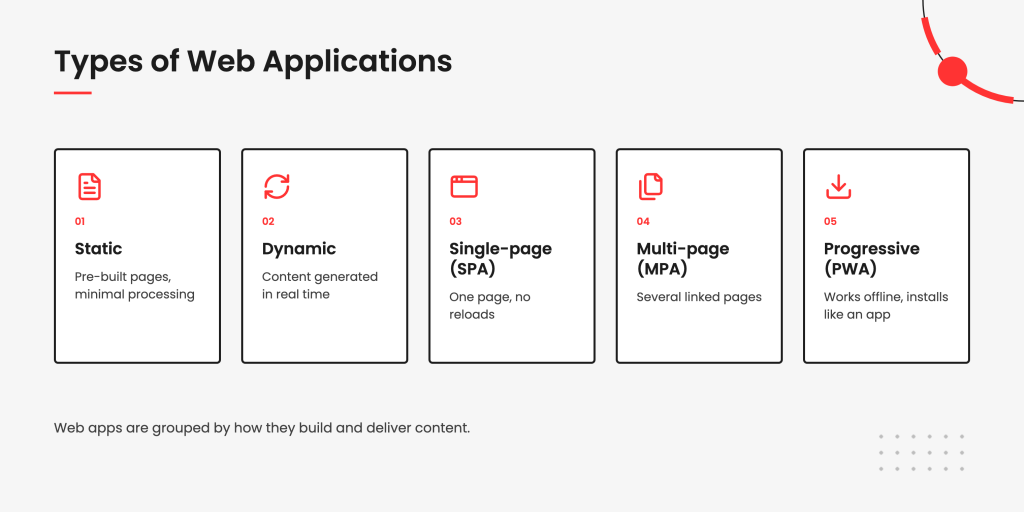
The most common way to group web applications is by how they build and deliver content. According to this distinction, they can be static, dynamic, single-page, multi-page, and progressive. The right type depends on how much the content changes, how much interactivity is needed, and how the app should perform. These categories overlap in practice — a single-page app is one kind of dynamic app, and large products often blend several approaches. Here are the most common types and what each one is for.
Static web applications
A static web application serves pre-built pages straight to the browser, with little or no server-side processing per request. Static apps offer fewer capabilities than other types, but they bring real strengths: fast, simple development, high flexibility, easy scaling, and a lightweight architecture. They shine when content rarely changes and speed matters.
Examples: Documentation portals with client-side search, and content-driven Jamstack apps built with static-site generators. (Plain landing pages and brochure sites, by contrast, are websites rather than apps — they have no interactive layer.)
Dynamic web applications
A dynamic web application generates content in real time, based on the user’s request and the server’s response. The information updates constantly, which gives businesses an easy way to serve users exactly what they’re looking for. Dynamic apps take more time and effort to build and maintain than static ones, but their versatility makes it worthwhile.
Examples: YouTube, Netflix, Facebook, TikTok.
Single-page applications
A single-page application delivers content through one web page that never needs a full reload to show new information. SPAs rely on the browser rather than the server to build and display data, which makes them fast and smooth to use. Despite the simple-sounding architecture, they give developers and product owners enormous flexibility and keep improving.
Examples: Gmail, Google Maps, X ( formerlyTwitter), GitHub.
Multi-page applications
A multi-page application spans several linked pages, loading a new page from the server as users move through it. This model suits larger products with a lot of content or many distinct sections, such as online stores and marketplaces. Modern MPAs often blend in dynamic techniques so navigation still feels quick.
Examples: Amazon, eBay, large eCommerce and enterprise portals.
Progressive web applications
A progressive web application uses modern browser features to behave like an installed app — it can run offline through cached data, send push notifications, and launch from the home screen. PWAs and SPAs aren’t competing types: a PWA is defined by a set of technologies (service workers, a web app manifest), while a SPA is a front-end architecture.
In reality, the two overlap constantly. A single-page app becomes a progressive web app once you add a service worker, offline caching, and a manifest, which is why many products are built as both at once.
Examples: Uber, Tinder, Starbucks, Pinterest, Spotify.

What Is the Tech Stack Used to Develop a Web App?
There are two broad routes to building a web app. Standard business needs — content, customer records, internal operations — are often met fastest with a ready-made platform like a CMS, CRM, ERP, or a no-code builder, which need little coding and can go live quickly. Unique or complex products, such as SaaS platforms and marketplaces, call for a custom stack instead.
For the ready-made route, the platform choice comes down to what the app is for:
| Platform | Best for | Typical use |
| CMS | Content-heavy sites where users create and manage a lot of content. | News, blogs, publishing. |
| CRM | Collecting and using customer data — names, emails, phone numbers. | eCommerce, customer support. |
| ERP | Registering employee data and integrating day-to-day operations in one place. | Tracking hours, wages, workflows. |
Page and website builders are another popular route. Tools like Wix and Squarespace offer drag-and-drop interfaces and pre-designed templates, so simple apps can be built without programming. With ready-made templates, a basic dynamic web application can take just a few hours.
Once the app is ready, the last choice is a hosting provider. Companies generally have three options:
| Hosting | Strengths | Trade-offs |
| On-premise | Full control; servers on the organization’s premises. | High infrastructure and maintenance cost; suits large enterprises. |
| Cloud-based | Scalable and cost-effective; pay only for what you use. | Security can be less robust than on-premise in some cases. |
| Dedicated server | More control and optimization; safer than shared hosting. | More expensive; needs server-management expertise. |
Most builders bundle hosting in. Wix and Squarespace, for instance, are cloud-based and host the sites built on them, so there’s no separate provider to manage.
At the same time, ready-made solutions aren’t a one-size-fits-all answer. They allow some customization but stay restrictive on scalability and advanced features compared with a custom build. That’s why businesses with unique requirements — advanced integrations, complex functionality — still opt for custom development to stand out.
Popular Technologies Behind Custom Web App Development
A custom web app is built from three layers: front-end technologies for the interface, back-end technologies for the logic and data, and a database. The specific stack depends on the app’s size, complexity, and performance needs. Here are the technologies most commonly used in each layer.
Front-end technologies
The front end drives the user interface and, ultimately, user satisfaction, so it gets close attention. HTML and CSS can build a working app, but most teams reach for the JavaScript and TypeScript ecosystem for richer, more maintainable interfaces:
| Technology | What it is and where it fits |
| React | A JavaScript library well-suited to large, dynamic web apps with rich functionality. |
| Angular | A TypeScript-based framework for building structured, dynamic web apps. |
| Vue.js | A flexible JavaScript framework that scales from small widgets to full apps. |
| TypeScript | A typed superset of JavaScript that catches errors early and keeps large codebases maintainable. |
| Next.js | A React framework adding server-side rendering, routing, and static generation out of the box. |
| Nuxt | The Vue equivalent of Next.js, handling rendering and routing for Vue apps. |
Back-end technologies
The back end is the part users never see, but it directly shapes the app’s speed, stability, performance, and security. These technologies are common choices for building it:
| Technology | What it is and where it fits |
| Node.js | A cross-platform JavaScript runtime for building scalable back-end services. |
| NestJS | A structured Node.js framework for maintainable, enterprise-grade back ends. |
| Laravel | A PHP framework with everything needed to build modern web apps, good for small to mid projects. |
| .NET Core | A framework for Microsoft-based solutions. |
| Go | A language suited to solutions with heavy query and request loads. |
| Django | A Python framework with a built-in admin console for simple management. |
Database technologies
A secure, stable database the back end can reach quickly is essential, and the choice usually comes down to whether the data is structured (relational) or flexible (NoSQL). These are the common options:
| Database | Type and where it fits |
| PostgreSQL | Relational; a robust default for complex, structured data. |
| MySQL | Relational; widely used and well supported for general-purpose apps. |
| MongoDB | NoSQL; document store suited to flexible or evolving data. |
| Redis | In-memory store used for caching and fast, temporary data. |
Deployment and infrastructure
How an app is deployed matters as much as how it’s built. Three approaches now shape most modern stacks:
- Serverless and edge — code runs on demand, close to the user, scaling automatically without managing servers. It suits variable traffic and low-latency needs.
- Containerization — tools like Docker package an app with its dependencies so it runs the same everywhere, from a developer’s laptop to production.
What Is the Cost of Web Application Development?
The cost of web application development depends on the app’s type and size, the tech stack, and the number of specialists involved. A simple brochure-style app sits at one end, a complex platform with custom logic and integrations at the other. Team location is the other big lever, which is why so many companies outsource.
The regional gap is stark. A senior developer in the US bills roughly $130,000-60,000 a year, while a developer of the same seniority in Eastern Europe often costs 40-50% of that. The annual cost of a remote senior developer working from Ukraine averages around $60,000 in 2026, roughly 40-50% of equivalent US total compensation. That differential is the core reason both large and small companies turn to outsourcing to bring development costs down.
“When comparing developer rates across different regions, it’s worth remembering that you are not just buying hours of coding. You are also getting an engineering culture, English proficiency, and the team’s ability to independently make strong architectural decisions.”
The table below compares average annual salaries for web developers across regions, so you can weigh the trade-offs.
| Region | Senior Developer (USD/yr) | Entry-level (USD/yr) |
| USA | $130,000 – $160,000 | $75,000 – $95,000 |
| UK | $75,000 – $100,000 | $40,000 – $52,000 |
| Canada | $85,000 – $110,000 | $50,000 – $65,000 |
| France | $50,000 – $72,000 | $35,000 – $46,000 |
| Israel | $70,000 – $95,000 | $42,000 – $55,000 |
| Poland | $55,000 – $75,000 | $30,000 – $42,000 |
| Ukraine | $50,000 – $66,000 | $28,000 – $40,000 |
| Latin America | $45,000 – $70,000 | $28,000 – $40,000 |
| China | $40,000 – $62,000 | $25,000 – $35,000 |
Figures are approximate 2026 annual averages blended from Glassdoor, Jobicy, Arc.dev, and cross-market rate surveys. Local employment salaries differ from client-facing contractor rates.
Beyond salaries, it helps to think about total project cost by complexity.
| Project type | Typical cost range | Example |
| Simple | $15,000 – $40,000 | MVP, landing app, basic dashboard. |
| Mid-complexity | $40,000 – $120,000 | SaaS product, eCommerce platform. |
| Complex / enterprise | $120,000 – $300,000+ | Custom logic, integrations, high load. |
Outsourcing to Eastern Europe or Latin America is the most common way to compress these numbers without sacrificing quality, since the same seniority costs a fraction of US or UK rates.
Skip the hiring, keep the expertise.
Outsource development to QArea.

Web Application Development Process: Step by Step
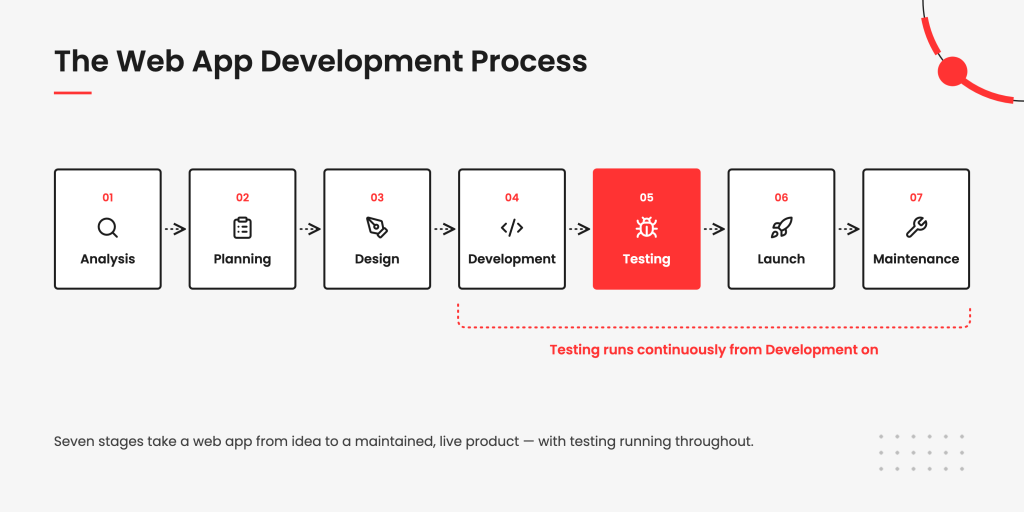
Web application development runs through seven stages: analysis, planning, design, development, testing, launch, and maintenance. The process is the same whether you build in-house or outsource, so it’s worth understanding in order to control it. Here is what the steps look like at a glance.
| Stage | Typical duration | Who’s involved | Deliverable |
| 1. Analysis | 1-3 weeks | Stakeholders, business analyst | Requirements, project brief |
| 2. Planning | 1-2 weeks | PM, tech lead, stakeholders | Scope, estimate, roadmap |
| 3. Design | 2-6 weeks | UX/UI designers | Wireframes, prototype |
| 4. Development | 2-9 months | Front-end, back-end devs | Working application |
| 5. Testing | Ongoing | QA engineers | Test reports, fixes |
| 6. Launch | 1-2 weeks | DevOps, PM | Live product |
| 7. Maintenance | Continuous | Full team, support | Updates, monitoring |
Now let’s look at each step in detail.
Step 1. Initial analysis
Analysis is the most important stage of the web application development process, and skimping on it is how projects fail. This is where you research the project and define exactly what it needs to do, ideally alongside stakeholders. Answer the core questions early — who the audience is, why they’ll use the product, what problem it solves, and how it differs from what’s already out there — because weak product-idea research is a leading reason products collapse.
“Business analysis isn’t just about writing down what the client wants. Sometimes you need to explain why a feature isn’t worth building at this stage or suggest a simpler alternative. A good discovery phase helps us focus the budget on what the product actually needs for launch.”
Step 2. Planning
Planning turns the idea into an action plan covering team, timeline, budget, and methodology. Your technical partner — whether a dedicated team or an outsourcing company — works out how many specialists the project needs and which business model fits best. This is also where key deliverables, security, and agreements get settled, so both sides can move forward without surprises.
Step 3. Product design
Design is where requirements become a prototype and you finally see how the product will look. Prototyping lets you walk in users’ shoes, test navigation and flow, and catch bottlenecks early, before they get expensive to fix. Simple wireframes can be sketched by hand in a day, while multi-page or custom apps are best prototyped in tools like Figma, Sketch, or Adobe XD, typically over a few days to a couple of months.
Step 4. Development
Development is where the app gets built, with the project manager keeping the work on spec and on schedule. A full build, front end and back end, usually takes several months and scales with the size and functionality of the app. Most teams now run this in Agile sprints for the flexibility and speed it brings, adapting as requirements shift, while business owners mainly attend progress meetings and sign off on milestones.
Step 5. Testing
Testing should run continuously, with QA involved as early as possible and working alongside developers rather than bolted on at the end. Bugs caught late are far more expensive to fix: according to CISQ’s Cost of Poor Software Quality in the US, poor software quality cost the US economy an estimated $2.41 trillion that year. Building QA into the process from the start is what keeps a project off that ledger.
“Testers should be brought onto the project as early as the Figma mockup stage.”
Step 6. Launch
Launch is the moment the product goes live for a broad audience, and it’s more than flipping a switch. It also covers how the product is introduced to the market and how users are onboarded to its features. Strategic rollout planning at this stage sets up the app’s first impression.
Step 7. Maintenance and further development
Development doesn’t end at the last line of code. A live app needs continuous monitoring and improvement to keep working well and stay relevant, so the post-launch stage belongs in the plan from the start. Collecting user feedback and refining functionality over time is what sustains long-term success.
What Are the Web-Based Application Examples?
Web-based applications span every category of online activity, from productivity suites to marketplaces to streaming platforms. What separates each from an ordinary website is interactivity: users create, transact, or communicate inside the app, and the content responds in real time. Here are common examples grouped by what they do.
Productivity
Google Docs, Notion, Trello, and Figma let people create and edit work directly in the browser, with changes saved and synced live. They’re web apps because the content is generated by the user and updates instantly, not served as fixed pages.
Commerce
Amazon, eBay, and Shopify storefronts handle search, carts, payments, and accounts in real time. Each user sees a different, dynamically generated experience — recommendations, order history, checkout — which a static site can’t produce.
Communication
Gmail, Slack, and WhatsApp Web send, receive, and organize messages without reloading the page. They qualify as web apps because they process and display new data continuously, driven by what users do.
Media
YouTube, Netflix, and Spotify stream content, track viewing history, and adapt what they show to each account. The personalization and real-time playback are what make them applications rather than pages of listed content.
Designing a Web Application
Designing a web application means shaping how it looks, behaves, and adapts across devices, not just drawing screens. Four areas carry the work: the interface patterns users interact with, how the app manages state, how it responds to different screen sizes, and the design system that holds it all together. Prototyping is where these decisions get tested before development starts.
- UX patterns. Familiar conventions — navigation, forms, modals, search, filtering — let users move through an app without relearning it.
- State handling. Designing for state means planning the loading, empty, error, and success views for every interaction, so the app never leaves users guessing.
From our projects: On a pergola-and-railing configurator we built for a construction-materials retailer, state handling was the whole game — the app tracks every component a user combines, recalculates the price live, and lets them save and share a configuration by link. It logged over 7,807 configurations in 2023, 556 of them through an Autodesk visualizer.

- Responsive behaviour. Flexible layouts and breakpoints let content reflow to fit a phone, tablet, or widescreen monitor from one codebase.
- Design systems. A shared library of components, colours, typography, and rules keeps the product consistent as it grows and speeds up both design and development.
Who Builds a Web App?
A web app is built by a team, not a lone developer, with each role owning a distinct part of the product. A typical team pairs a project manager and business analyst on the planning side with designers, front-end and back-end developers, QA engineers, and DevOps on the build side. Here is who does what on a typical project.
| Role | What they own |
| Project manager | Timeline, budget, scope, and keeping the team on track. |
| Business analyst | Requirements, turning business goals into a clear spec. |
| UX/UI designer | Wireframes, prototypes, and how the app looks and feels. |
| Front-end developer | The interface users see and interact with in the browser. |
| Back-end developer | Server logic, databases, and the app’s core functionality. |
| QA engineer | Testing for bugs, performance, and compatibility. |
| DevOps engineer | Deployment, hosting, and the CI/CD pipeline. |
Team size scales with the project. A small app might combine several of these roles in one or two people, while a complex platform needs specialists in each. On the sample fulfillment platform above, for instance, the team ran to a project manager, two front-end, two back-end, two mobile, and two QA engineers.
Custom, CMS/CRM, or Low-Code: Which One to Choose?
The right build approach comes down to three questions: your budget, the scale you need, and how unique your app’s logic is. Match your situation to one of these:
- Choose a CMS, CRM, or ERP when your needs are standard and speed matters more than uniqueness — content management, customer records, or internal operations that off-the-shelf platforms already handle well, on a modest budget.
- Choose low-code or a site builder when the budget is tight, the app is simple, and you need it live fast, accepting limits on customization and scale in exchange for speed.
- Choose custom development when the logic is genuinely unique, the app has to scale, or you need integrations and features off-the-shelf tools can’t deliver — the higher upfront cost buys full control and longevity.
“The most common mistake we see founders make is trying to force a low-code tool to handle complex business logic. You might save a month at the start, but six months down the line, you might hit a wall and have to rewrite everything from scratch using a custom stack.”
Got a project in mind?
Share the details and find out what it will take.
The Future of Web App Development: 2026 Trends
Web app development in 2026 is shaped by AI moving into both the toolchain and the product, alongside faster, more capable delivery models.
“AI coding tools haven’t replaced developers, but they have changed how we work. An experienced developer can now handle many routine tasks much faster, so more of their time can go into architecture, complex logic, and decisions that still require engineering experience.”
Five trends especially stand out:
- AI-assisted development. AI coding tools now handle code generation, review, and test automation, speeding up delivery and freeing developers for higher-value work. The shift is toward developers collaborating with AI rather than being replaced by it.
- AI features inside the app. Beyond the toolchain, AI is being embedded in the product itself — chat assistants, recommendations, semantic search, and content generation are becoming standard user-facing features rather than differentiators.
- Progressive web apps. PWAs keep gaining ground by running fast and smoothly regardless of connection quality, working offline through caching, and installing on devices like native apps. Pinterest, Google Maps, and Starbucks are well-known examples.
- WebAssembly. WebAssembly lets code written in languages like Rust and C++ run in the browser at near-native speed, powering demanding apps — video editing, games, CAD — that were once desktop-only.
- Edge and serverless. Running code on demand at the network edge, close to users, cuts latency and scales automatically without managing servers, which is why it’s becoming a default for modern web apps.
Reach Your Customers Where They Already Are
Web applications help businesses connect with their audience without making them install new apps or go through extra steps. However, building a web application takes careful planning, solid technical skills, and a willingness to keep pace with new tools and trends. For companies whose experience has mostly been in website development, that can feel like a steep climb. This guide has walked through the stages, technologies, and costs involved, so you should now have a clear sense of where your own project should begin.
If you’d rather not build alone, an external team can carry the technical load. QArea has broad experience creating web apps across industries and offers web application development services built around your business goals.
Frequently Asked Questions
 What is web app development?
Web application development is the process of building interactive software that runs in a web browser instead of being installed on a device. It spans front-end development for the interface, back-end development for the logic and data, and testing, and it uses client-side and server-side programming to make the app work. The result is a product users reach through a URL, from a simple tool to a complex custom web app.
How does a web application work?
A web application works by exchanging requests and responses between a browser and a server. The user’s browser sends a request, the web server passes it to the application server, which processes it and returns the result, and the browser displays it — often updating the page without a full reload. This request-response cycle is what lets a web app handle data in real time.t offers more flexibility, scalability, and the ability to implement advanced features not possible with off-the-shelf tools.
What’s the difference between front-end and back-end development?
Front-end development builds the part of a web app users see and interact with, using technologies like HTML, CSS, and JavaScript frameworks. Back-end development builds what users don’t see — the server logic, databases, and APIs that power the app’s functionality. Both run in a shared development environment and have to work together for the app to function.
What is web application architecture?
Web application architecture is the structure that defines how a web app’s components — client, server, database, and APIs — connect and communicate. It determines how requests flow, where data lives, and how the app scales, and it shapes decisions across the whole development lifecycle. A well-planned architecture is what keeps an app stable as traffic and features grow.
What’s the difference between a web app and a hybrid application?
A web app runs entirely in a browser and needs no installation, while a hybrid application wraps web technologies in a native shell so it can be installed from an app store. Hybrid apps can access device features through plugins, which pure web apps can’t, but web apps reach any device with a browser. The choice depends on whether app-store distribution and device access matter for your product.
What’s the difference between CMS, CRM, and ERP platforms?
A CMS manages content-heavy sites like blogs, a CRM manages customer interactions for eCommerce or support, and an ERP integrates internal business operations. Each is a ready-made platform suited to a different standard need. The right one depends on what the app has to do.
Why choose custom development over a website builder?
Custom web development offers the flexibility, scalability, and advanced features that off-the-shelf builders can’t. A website builder is faster and cheaper for simple apps, but restrictive once needs grow. Custom is the choice when the logic is unique or the app has to scale.
How long does it take to develop a web application?
Most web applications take a few months to build, though timelines scale with scope and complexity. A simple app can be ready in weeks, while a complex platform can run six months or more across planning, design, development, and testing. Building in Agile sprints keeps larger projects on track.
Is outsourcing web development a good idea?
Outsourcing can cut costs significantly without sacrificing quality, which is why many companies do it. Developers in regions like Eastern Europe or Latin America deliver comparable work at a fraction of US or UK rates. It works best with a partner that has a proven track record in your type of project.
How is AI changing web development?
AI is changing web app development on two fronts — the toolchain and the product. AI coding tools speed up code generation, review, and testing, while AI features like assistants and recommendations are increasingly built into apps themselves. Developers now work alongside AI rather than being replaced by it.
Share:


- Key Takeaways
- What Is a Web App?
- Web Apps and Websites: How Do They Compare?
- Web Apps and Mobile Apps: Key Differences
- Web Apps vs. Hybrid vs. Native Application Development
- What Are the Benefits of Web Apps for a Business?
- What Are the Web-Based Application Examples?
- Designing a Web Application
- Who Builds a Web App?
- Custom, CMS/CRM, or Low-Code: Which One to Choose?
- The Future of Web App Development: 2026 Trends
- Reach Your Customers Where They Already Are
- Key Takeaways:
- What Is a Web App?
- Web Apps and Websites: How They Compare
- Web Apps and Mobile Apps: Key Differences
- Web Apps vs. Hybrid vs. Native Application Development
- Benefits of Using Web Apps
- Types of Web Apps
- Tech Stack Used to Develop a Web App
- Popular Technologies Behind Custom Web App Development
- The Cost of Web Application Development
- Web Application Development Process: Step by Step
- The Future of Web App Development
- Final Thoughts
Planning to improve development process?
Decrease the entropy of product design and development, and increase your chances of success.

Hire a team
Let us assemble a dream team of specialists just for you. Our model allows you to maximize the efficiency of your team.
Written by



We Help With
Your tech partner needs to be well versed in all kinds of software-related services. As the software development process involves different stages and cycles, the most natural solution is to have them all performed by the same team of experts. That’s exactly what our diverse range of services is for.
The choice of technology for your software project is one of the defining factors of its success. Here at QArea, we have hands-on experience with dozens of popular front-end, back-end, and mobile technologies for creating robust software solutions.
In-depth familiarity and practical experience with key technologies are one of the cornerstones of successful software development and QA. But it also takes specific knowledge of the industry to develop a solution that meets the expectations of the stakeholders and propels its owner to success.


Ensure an effective online presence for your business with a corporate site.